What it is
Sold Homes puts your own closed sales on your website. Every home an agent on your Our Agents list sold as the listing agent gets its own page, and /sold/ lists them all, with a page for each city at /sold/in/ the city’s name. A seller choosing between agents sees proof of sales in their market, and each page can rank when people search for recently sold homes.
Only the listing side is shown. The page exists to win listings, so a sale where your agent represented the buyer is left out.
What each sale page shows
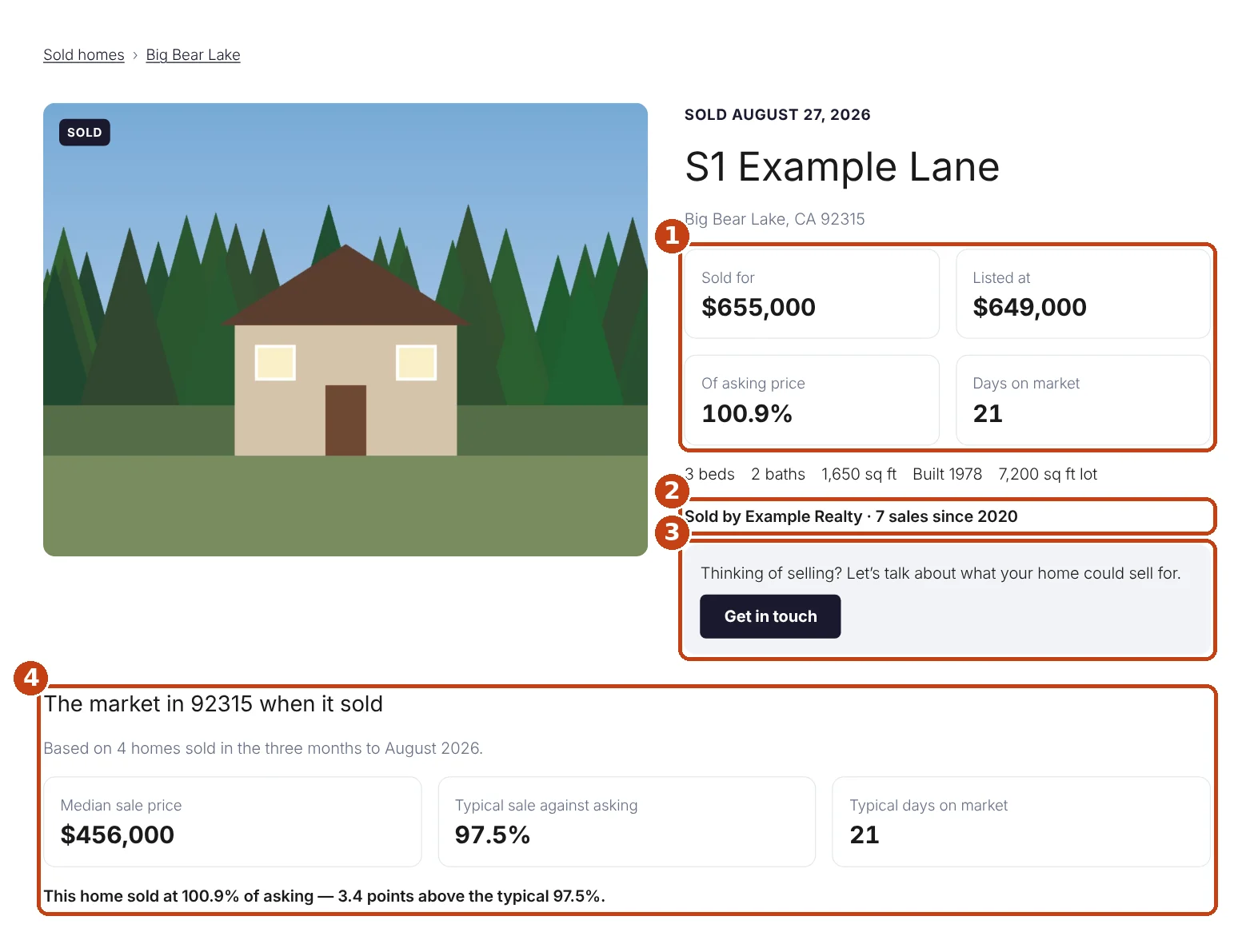
- What it sold for, what it was listed at, the percentage of asking and the days on market.
- Your track record — the sales your team has closed and since when.
- Your call to action, linked to your contact page or any page you choose.
- How the local market looked when it sold, and how this sale compared.
Further down: a map, more of your sales in the same city, similar homes for sale today and a link to every sale in that city.
What your MLS requires
Every sale page and every sale card shows who listed the home and who represented the buyer, the sold date, the period your figures cover and your MLS’s required notice. These always appear and cannot be turned off.
A sale only appears when your MLS allows sold listings on agent websites, when the seller or buyer has not withheld it from the internet, and when every detail your MLS requires is present. Sales are re-checked every six hours, so one that is withheld after it was published comes down on its own.
Photos
Once a home sells, the MLS keeps only its main photo online, so each sale page is built around one photo.

